Friday, 21 June 2013

HOW I PREPARED MY ANIMATION (CLAYMATION)

For my animation i first started to plan out what kind of animation i was going to do whether it would be going from cutout animation to even timelapse animation or even cel based as i first planned out to do my animation as a 3d model based animation but make it look like a stopmotion kind of look to it which is what i would of liked to match with the subject we were doing which was stopmotion. I then found out after planning it that i could not be able to do that but the way i could of done it would've been complicated so i thought of something else, a different style of what i could do it in and i then chosen claymation as it was the easiest i could do and the more fun way of doing stopmotion as you then get to make your models yourself with all the colours and etc. This then made me change the whole story/animation i was going to do as i was going to do a minecraft animation in the 3D program i work in which is called Cinema 4D but make it look like stopmotion but i then changed it to Space Invaders as thats what i thought would've made a better animation.

I prepared my work by looking at a series of videos on youtube of how Space Invaders looked and this is the type of research i came up with:
This is the kind of animation i looked at and used two features from this video which was the green shooter killing the white enemies and then i picked one of the white enemies which looked like this:
I then begin to plan out how i wanted the story to be as i first made the green shooter which would kill the white enemy but in my story i made the enemy above blue as i wanted it to look like a boss enemy so that then the green shooter have to use a missile to kill the boss fight he was up against.

Thursday, 20 June 2013

Cel Animation

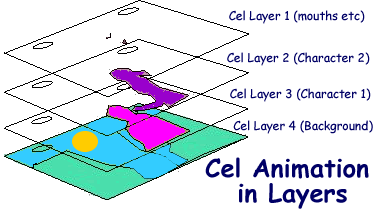
Cel (celluloid) based animation is generally just how you would see every cartoon these days which is showcased on TV for example dragon ball z is perfect example of this as you know that the artists who have made this animation have drawn out each frame by frame to create a little short episode which could take up to weeks or months to even create one episode depending on how many animators they have as they'll all need to make sure that they each have the same colour pallet as each other in order to have consistant colouring and shading. Most of the Cel based animations stopped for some animators in about the early 90s as thats when most animation studios for example Disney started to used CAPS (Computer Animation Production System) which replaced what was originally Cel in the overall element of animation.

The process seems to be simple enough as if they had to draw the background then they could just overlay bits of over cel based animation over the top of this:

Thursday, 6 June 2013

Final Animation/Response to criticism

Here is my finished final stop motion animation:


I first started out my video by brainstorming some ideas of what i could make for my animation thinking of different styles of animation such as claymation, pixelation, model animation, cutout and time-lapse. I decided to use claymation and made a video about space invaders where basically there was 2 models one the space invader and the one the kills the space invader. I also had to think of song to go with the video so I typed space invaders soundtrack into youtube to try and find like an original sound which was used in the actual space invaders game but came across a 8bit sound version of a song from The Prodigy and thought that it would fit well with the actual video.


I started off by adding a base layer which was the "Dark Gray Solid 1" and added a keyframe to the beginning and the end to have a fade in and a fade out so that it didnt start and stop abruptly, i also added 3 individual adjustment layers which had the Colour Grading to it. Adjustment layer 1 had the basic colour grading to it which involved: Curves, Levels, Sharpen and Hue/Saturation which gave the background a colour grade to make it look less boring.

I then added another adjustment layer which is adjustment layer 2 which had a basic exposure effect to it which would lighten the background to look like it had a low opacity light gray to it bring out the dark colour a bit more.


I then added another adjustment layer which is adjustment layer 3 which had a Ramp which acted like a gradient which come out lighter in the center, a levels adjustment which made that gradient lighter and more bolder which would make it stand out a lot more when viewing the video and also Calculations which controlled the overall gradient look to it so that I could control everything just by one effect.

I then applied a type of motion to my text which would fly into the center of the screen from afar which involved making it a 3D layer within After Effects so that the type of motion could be possible as i used the Z axis of the 3D layer and had it fly in. 

This I then followed the keyframe to go in a motion where the Z axis keyframe would fly in from afar to the center which i also added motion blur to it as it would of made the animation look smoother and more dynamic instead of just looking like it had no motion to it which also gives off an effect that its moving fast and showing that there is motion in the animation. 

I then also added a gaussian blur onto the layer so that it would fade out unnoticeably without being to obvious that it was a fade out making sure that the fade out from the text layer wasn't the main focus of the screen so that it smoothly faded out with the opacity being turned down as well as gaussian blur being added to it. 

I then added a type of motion which i used with the fly in of the text but instead of having it come in on the Z axis i made it come in from the Y axis which i then added the same type of motion blur which made it have more motion/dynamic to it.

I then made the ending of the stopmotion fade out into the background and then had the credits scroll up the screen but keyframed that motion too as they're no presets for credits which i could find in After Effects which would let me do that type of motion without adding the keyframes myself. 

Response to criticism

For my animation I used claymation as I wanted to do 3D model based animation at the start of the first time we got informed about this assignment as i wanted to do a 3D model based animation within a 3D program called Cinema 4D as i wanted to make a story which involved an assassin in a minecraft village who killed a enemy he had to fight against in the animation but i got told that i couldn't do it as it wouldn't of been a stop motion so i turned quickly to think of different animations i could use and which would be quicker and easier for production wise so i chosen to do claymation and did a story about space invaders but if i were to do it again i could of chosen different types of animation such as cutout which would of been easier as i would have just had to print out 3 pieces of models to work with; the space invader, the enemy and the missile as this would mean that i wouldn't of had to model the models to a size and have the animation move in a clay form.

The Pros of it being a claymation was that i could make really good models to fit how i wanted them to be including the size, detail and style of movement as with a different type of animation like cutout i would then need to take that image into photoshop and add the detail onto it but then it would be a hassle of adding the detail onto the image and then picking the size that i wanted it to be as i didn't know how big the table would be to fit the model, another pro of claymation is that i can be a bit more hand on with the model production instead of picking an image off google and printing it. 

The Cons of it being claymation would be that it would take time to create models for my animation as i would need to find individual colours of clay so that i would make the models and have them set to right colours as if the colours i had didn't match the ones from the game then it wouldn't fit right unless you were making it more original to your colour scene which in my case that was my purpose as i didn't want to copy off the games colours.


I will take into consideration all of the feedback i have gotten for my animation and use the criticism to then make another animation better then this one but with the requirements of what people would want to see. 

Thursday, 14 February 2013

Studio Ghibli

Studio Ghibli
References:

Studio Ghibli has made a variety of films during his animating career and here is a link to some of the animations he has made:

Pandora hearts vol. 4 [Book]

Their are 17 books in total for this pandora heart series

Thursday, 31 January 2013

My Idea

Stopmotion

For my stopmotion animation i will be using a 3d program called Cinema 4D and i will be making the animation by moving parts bit by bit by rendering each part frame by frame but instead of rendering it as a animation i will make it look like it is stopmotion based as i think this will be easier for me to use and get things done quicker by using this way of stopmotion.

Here are some examples of what you can create in the actual program i will be using:


And here are some results of what you can achieve by the end of the process of building the scene and animating the choice of model:


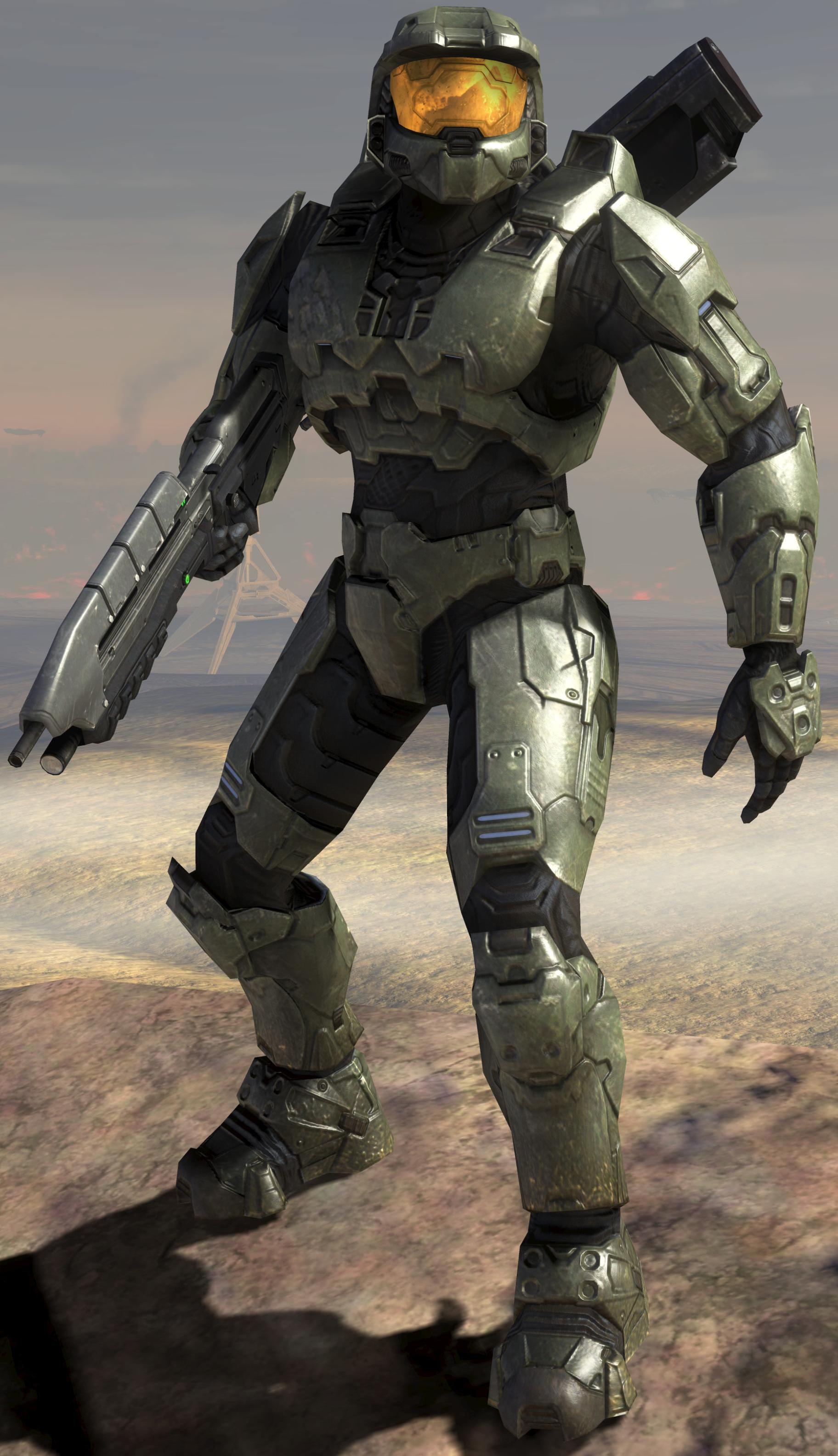
What my stop motion will be like it will have models from the halo series using the main character from halo and he will be fighting with the enemy of the other side which will be the covenant.


 I will be using references from certain animations to use this in my animation.

Here is some other examples of videos which will give me inspiration for the style of animation i will make whether i choose it to be fluid but realistic or slow with no realism aspect into it.

It is a video from one of my friends who is greatly in depth with his knowledge of 3d animations as many aspects of this video is led by a story but with some 3d animations in the whole video showing the story from start to finish.
Here is another example of halo animations which i will take inspiration from when making the animation for whatever story i am putting to it:


Here are some screenshots from my animation to show you that i have started it as i changed the whole idea from halo models fighting changed it to minecraft as i already had scenes built for minecraft where as if i did a halo animation i would need to find a halo map in either 3d or use original footage from a halo game and composite into the scene so this would mean rendering out the models and then importing them into the game footage using a video editing program and making the shadows fit the original shadows on the map so that it looks real and not to standing out to make it obvious that its 3d.
The idea i have now is minecraft related as i had a skin which was from the game assassins creed 3 which i made the model from assassins creed 3 hold an axe which he uses as a main weapon in that game so it would make sense for me to add that to him, he will hopefully by the end of the animation i want to make the model run from house to house but if thats not possible and i cannot figure a way how to do that then he will simply jump off the end house to kill the enemy as i have made the end sequence before i made anything to see how the end result would sort of turn out to look like as here are some of the screenshots to show you examples of the characters in the scene and the actual scene im working with as well.


Thursday, 13 December 2012

What needs to be completed?

Cel based animations + Examples
Claymation/Model animation + Examples
Timelapse animation + examples
Bits on history of animation
Cut out animation + examples
a bit more on persistance of vision

Thursday, 6 December 2012

Timelapse Animations

Timelapse Animations

Timelapse animation is a series of still images taken over a long period of time to trick people that it is moving image but in reality it is only a series of still images. Timelapses are usually taken showing the progression going from day to night and then back to day or it could be someone making something which would take hours to make and they set up the camera to take pictures every few seconds so by the end of the animation it will have taken thousands of pictures to build up a video clip of several thousands of pictures which would then either be left as individual pictures or you could convert them into a sequence which you could then also import into a editing program like Adobe After Effects as it reads sequence data so when you open the first one out of the group of pictures it opens up the rest of the pictures in a video form.


Thursday, 29 November 2012

Cutout Animation 2

This is an example of what i will be using in my cutout animation and here are examples of the two models i will be using, i will be using a dj deck and i will be using johnny bravo to create a sort of scratching effect which vinyl dj's do when producing a set.

We have included in this animation, a background which is a simple cartoon room for where everything will be held which will include a dj deck, johnny bravo, jessica rabbit.

Thursday, 22 November 2012

Cutout Animation


Cutout Animation

Cutout animation is a type of animation which animators use to animate flat objects with materials such as cardboard, paper and stiff fabric, which they create the actual characters with and also the backgrounds for the animation.

There are animations which are still used on TV to date and one of them i know of is called Charlie and Lola, as it is a children's TV show/animation based episodes. 

Here is an example of Charlie and Lola:

This is an example of what Charlie and Lola looks like, it was made in the year 2005 - 2008 as thats when it was commissioned to be made between, but even though it was made between them years it is still aired to date now. 


You set up cutout animation by firstly printing off what images you would like to use e.g. models, backgrounds and then once everything is printed off and ready to animate you then will cut the models at joints which you would want to move like hands, arms, waist, legs, feet and head depending on how complex or simple your animation will be will the decide how many joints you want to cut to animate as if its a complex animation then it will mean that your models will have a lot of joints able to move but if its a simple animation then you will only have 2-3 joints to move which will also depend on the style and way you're going to animate to match your planned out story.

Thursday, 25 October 2012

Thursday, 18 October 2012

Pixilation


During our lesson today we were given a task we created a stop motion animation and the idea was to create a short animation between 5 seconds and 10 seconds so we thought of an idea to make a student of our group to unzip his jacket but when we played the whole animation back it looked like his actual jacket unzipped itself to make the feel of the video creepy and feel like someone has unzipped his jacket but could not be seen in the video which added that weird paranormal feel to it, we involved a method of stop motion called pixilation which means a series of captured images taken for exactly 12 frames per second and we did this for 5 seconds so in total that was 60 frames for a short animation.

The way we exported the overall video was we exported all of the images into one video by exporting out of istopmotion by exporting the video out as a mp4 file format as we just wanted the actual animation exporting and not to change the overall file render format to for example HD 720p we just went with the set render settings to give us the video we wanted.

And then we got the embedded code from the actual youtube video and we pasted it into our blogs which gave us a video embedded in our post about pixilation,


Thursday, 11 October 2012

Animation 1950s - 1970s

Animations from 1950s - 1970s


  • Cinderella


Cinderella was a disney animated movie which was made in 1950 by a guy called Charles Perrault which was produced by Walt Disney Animation Studios and released by RKO Radio Pictures which is about a girl who gets bullied by her "Evil twin sisters" which made her do all the house work and choirs for themselves, and then she gets invited to go to a ball but her twin sisters wont let er and then she eventually goes to the ball but loses her show so the prince of the ball trys to find the girl with the missing shoe.


  • Popeye Old King Features
Popeye old king features was a animated television series which was first aired in the 1960s and was one of the earliest animated popeyes aired, but then they continued with the cartoon and made it right up to the year 1978 which Hanna Barbara took the show and made it into hour long series. 


Thursday, 4 October 2012

Animations - 1930-50s

There are loads of different animators back in the day between the years of 1930s-50s, one of the main animators was called:

  • Norman Maclaren
He made animations which had a abstract style to it for instance shapes that moved with the music which meant every beat or big sound a piece of abstract animation would move or animate to it.


This was a piece of abstract animation called neighbours, it was about two neighbours fighting over a flower with a series of different animations, video animation, stop motion animation and still photo animation. All these different animations were used to create the amazing piece of animation which is still very famous to date.


  • Max Fleischer
Max Fleischer was also an animator/film director and producer, he was most famous for animations such as betty boop, popeye and spiderman as he brought them kind of animations to the movie screen and was also an inventor which meant that he was also famous for inventing numerous technological inventions such as the rotoscope, here is an example of my favourite animation he has made:

The reason why i have chosen this kind of animation is because i like the way it transitions from Popeye being in real life and walking from real life in the page of the book and showing the animation through the book page which is pretty unique and original at the time, and that's what really caught my attention compared to other animations as these animations are really smooth.

  • Tom and Jerry

Tom and Jerry was a animation based series which came out in the 1940's and was made by two men called William Hanna and Joseph Babera making a series based on a rivalry between a mouse and a cat and throughout each episode of this series it always has some mischievous pranks on both the mouse and the cat but mainly on the cat as the cat usually is the one who gets angry first and chases the mouse.

I really loved tom and jerry as a kid and thought that it was a really good choice of animation to pick as its very smooth and enjoyable to watch at any age and really the overall animation from which were made by William and Joseph are really smooth and has brought a way of rivalry animations based on two characters.

  • Looney Tunes
Looney Tunes is a animation cartoon series which started off in the year 1930's and is still getting made to this current day, as looney tunes overall is a very popular animation based cartoon series as it is associated with a company called "Warner Bros"

I picked looney tunes as the other choice of animation as both looney tunes and tom and jerry are very popular all over europe and are still getting made to this current day and still have come up with so many different ideas and not just repeated some ideas which were made back between 1930s to the 1950s and still are continuing to make original ideas to date.

Thursday, 27 September 2012

The Older Animators Of Stop Motion

Early Animators:


  • George Melies - He was one of the earliest stop motion animators in film history, September 26, 1869 – July 26, 1934, he was a french stop motion animator and came into the animation business in the year 1888 worked progressively through his career as an animator.  He is know for such great films such as A Trip to the Moon and The Impossible Voyage both have a unique but strange style to them but they are great and enjoyable for the viewing purposes.

  • Winsor McCay - September 26th 1869 – July 26th 1934, Was an American cartoon drawer and was also an animatior who was known most for his incredible drawing/animation video called Gertie the Dinosaur and was also know most for his comic strip on Little Nemo which began in 1905. Winsor was a great artist who turned his own drawings into animations which really set the scene back in the 18 century, His films set a unique standard which was followed up by Walt Disney and others in later decades. His comic strip work has influenced generations of artists, including creators such as William JoyceAndré LeBlancMœbiusMaurice SendakChris Ware, and Bill Watterson. 

  • Lotte Reiniger - Charlotte "Lotte" Reiniger was a German silhouette animator and film director, she was born in June 2, 1899, Charlottenburg and died in June 19, 1981, Dettenhausen. She was known for such a strange but interesting style of film called The Adventures of Prince Achmed where it is all silhouette based animations which is a unique style of animation as I have never heard/seen someone make one but it is really interesting and was possibly her best movie/animation she had made alongside with other silhouette based animation which was her style when planning and producing an animation/film.

Thursday, 20 September 2012

Persistence Of Vision

Persistence of vision

Persistence of vision is the phenomenon of the eye by which an afterimage is thought to persist for approximately one twenty-fifth of a second on the retina

There are a few kinds of they way they use Persistence of vision, one of them is called zoetrope which is:

zoetrope is a device that produces the illusion of motion from a rapid succession of static pictures.
The zoetrope consists of a cylinder with slits cut vertically in the sides. On the inner surface of the cylinder is a band with images from a set of sequenced pictures. As the cylinder spins, the user looks through the slits at the pictures across. The scanning of the slits keeps the pictures from simply blurring together, and the user sees a rapid succession of images, producing the illusion of motion.
The second way of Persistence of vision is called Thaumoscope which is:

thaumatrope is a toy that was popular in Victorian times. A disk or card with a picture on each side is attached to two pieces of string. When the strings are twirled quickly between the fingers the two pictures appear to combine into a single image due topersistence of vision.

The first use of the thaumatrope was used in the year 1824 when it is a spinning coin which tricks your brain to look that images are moving back and forth, it is used as one example of the early animations when they did not have software to make these sort of animations which is used to this current date with such use of programs such as Adobe Flash which you can create flash animations with to an extent which would be more present rather then making one of these Thaumoscope animations